
IFERROR Function in Excel
Quick answer
IFERROR checks a formula and, if it returns any error such as #N/A or #DIV/0!, shows a value you choose instead. Reach for it when a lookup might not find a match or a calculation might divide by zero, and you’d rather see a clean result than an error.
IFERROR(value, value_if_error)Works in: Every current version of Excel, including Excel 365, Excel 2024, 2021, 2019, 2016 and Excel for the web, on Windows and Mac (it’s been around since Excel 2007). Google Sheets has IFERROR with the same syntax.
Syntax
IFERROR(value, value_if_error)| Argument | Required? | What it does |
|---|---|---|
value | Yes | The formula or cell to check. If it works out without an error, IFERROR returns its result unchanged. |
value_if_error | Yes | What to return if value is any error (#N/A, #VALUE!, #REF!, #DIV/0!, #NUM!, #NAME? or #NULL!). Can be text in double quotes, a number, a cell reference or another formula. Use "" to show a blank. |
How IFERROR works
Think of IFERROR as “try this, and if it goes wrong, use this instead”. Excel works out value first. If the result is a normal number, text or date, IFERROR passes it straight through. Only when value comes back as an error does IFERROR swap in value_if_error.
It catches every error type, which is handy but blunt: it can’t tell a lookup that simply found no match from a formula that’s genuinely broken. IFERROR doesn’t fix anything. It only changes what the cell shows.
In Excel 365 and 2021 you can also hand it a whole range. It returns an array with every error replaced, so =SUM(IFERROR(D2:D5, 0)) totals a column that contains errors without needing Ctrl+Shift+Enter.
Examples
All three examples use the Bluegum Café workbook, with headers in row 1 on every sheet. The Basic example uses the Staff sheet with a Tips This Week column added in F. The other two use the Invoices sheet, extended to four July bills, and a new Payments sheet: the café’s July bank export with one row per supplier payment.
| Staff ID | Name | Role | Hourly Rate | Hours This Week | Tips This Week |
|---|---|---|---|---|---|
| S01 | Mia Nguyen | Barista | $28.50 | 32 | $48.00 |
| S02 | Jack Thompson | Cook | $30.10 | 38 | $57.00 |
| S03 | Priya Sharma | Barista | $28.50 | 0 | $0.00 |
| Invoice No | Date | Supplier | Category | Amount ex GST | GST | Total |
|---|---|---|---|---|---|---|
| INV-1001 | 03/07/2025 | Ridgeline Roasters | Coffee beans | $480.00 | $48.00 | $528.00 |
| INV-1002 | 04/07/2025 | Coastal Dairy Co | Milk | $215.50 | $21.55 | $237.05 |
| INV-1003 | 07/07/2025 | Surf Coast Packaging | Takeaway cups | $310.00 | $31.00 | $341.00 |
| INV-1004 | 10/07/2025 | Ridgeline Roasters | Coffee beans | $480.00 | $48.00 | $528.00 |
| Invoice No | Date Paid | Amount Paid |
|---|---|---|
| INV-1001 | 08/07/2025 | $528.00 |
| INV-1002 | 09/07/2025 | $237.05 |
| INV-0987 | 04/07/2025 | $495.00 |
| INV-1003 | 14/07/2025 | $341.00 |
Basic: Stop #DIV/0! when someone worked zero hours
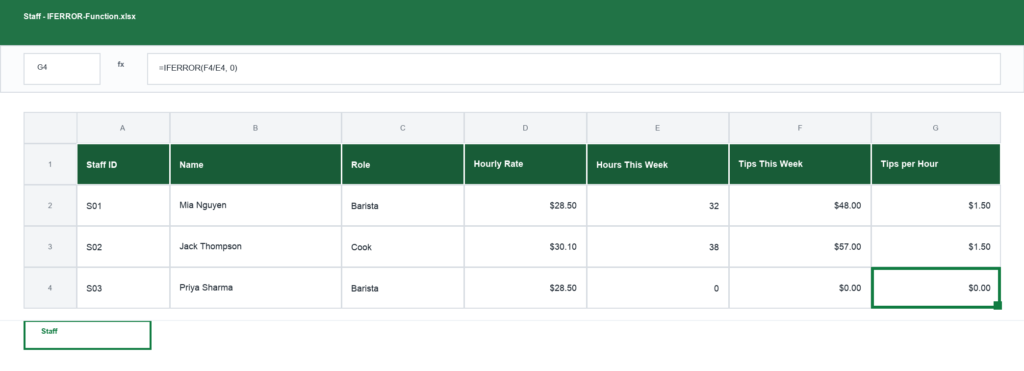
On the Staff sheet, tips per hour worked is the tips in F2 divided by the hours in E2. The formula goes in G2 and is filled down to G4.
=IFERROR(F2/E2, 0)Mia’s row returns $1.50 per hour (format column G as currency). Priya was on annual leave, so row 4 is 0 divided by 0. On its own that’s #DIV/0!; with IFERROR the result is 0, and a total of column G still adds up.
Real-world: Match July bank payments to supplier invoices
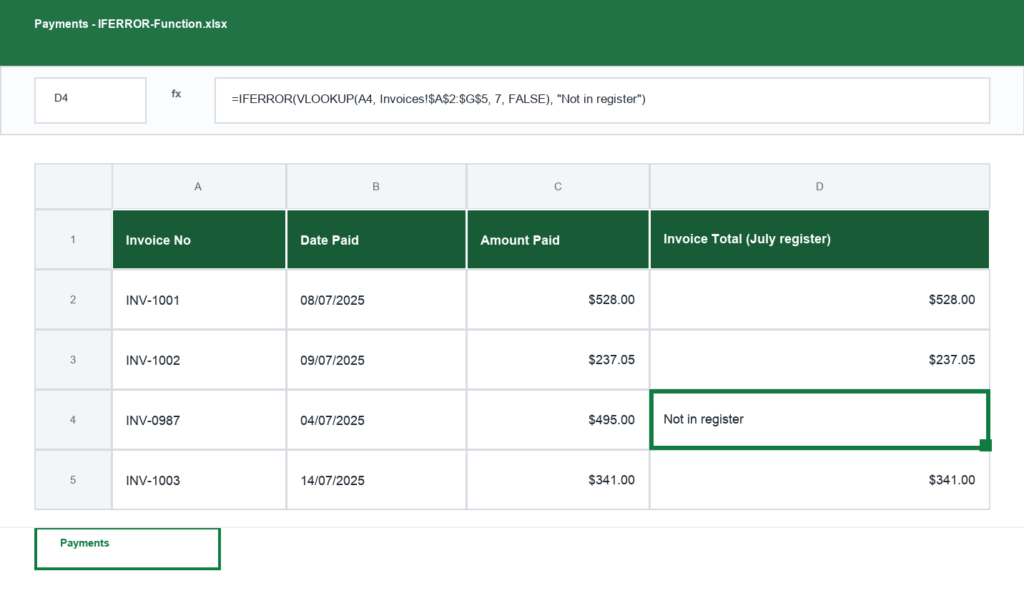
On the Payments sheet, the invoice number is in A2 and the formula goes in D2, filled down to D5. It looks up each payment in the Invoices register and returns the invoice total from column G.
=IFERROR(VLOOKUP(A2, Invoices!$A$2:$G$5, 7, FALSE), "Not in register")D2 returns $528.00, matching the $528.00 that left the account. D4 returns Not in register: INV-0987 isn’t on the July register, so VLOOKUP’s #N/A is replaced with a note I can filter on before I sit down to do the BAS.
Advanced: Fall back to last financial year’s register
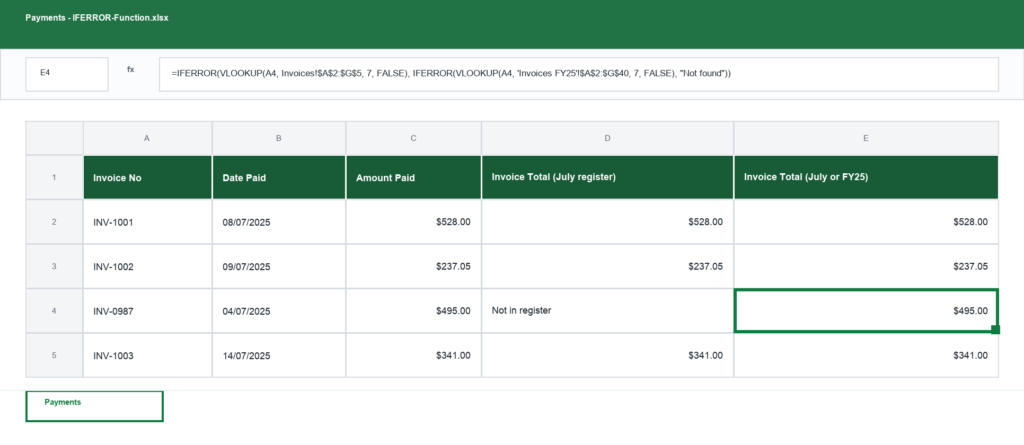
INV-0987 is a Ridgeline Roasters bill dated 26/06/2025 for $495.00, so it lives on the Invoices FY25 sheet (same layout, data in A2:G40). On the Payments sheet, the formula goes in E2 and is filled down to E5. The second lookup sits inside value_if_error, with its own IFERROR around it.
=IFERROR(VLOOKUP(A2, Invoices!$A$2:$G$5, 7, FALSE), IFERROR(VLOOKUP(A2, 'Invoices FY25'!$A$2:$G$40, 7, FALSE), "Not found"))Rows 2, 3 and 5 match on the first lookup. Row 4 fails, so IFERROR hands over to the second lookup, which finds INV-0987 on the FY25 sheet and returns $495.00. Only a payment missing from both registers shows Not found.
Guru Tip
I only wrap IFERROR around a formula after I’ve checked the formula works. IFERROR hides every error, so if someone deletes a column in the register, the #REF! that should be shouting at you quietly becomes “Not in register” and the reconciliation looks fine when it isn’t. For lookups I use IFNA instead: it only catches #N/A (no match), so real breakages still show up.
Common errors
#NAME?: text in value_if_error isn’t in quotes
Cause: In =IFERROR(F2/E2, Not found), Excel reads Not found as a name that doesn’t exist. The error sits in IFERROR’s own argument, so IFERROR can’t catch it. A misspelt function, like IFEROR, does the same. Fix: Put text in double quotes, "Not found", and check the spelling of every function name.
#N/A: the fallback lookup also failed
Cause: IFERROR only checks value. If value_if_error is itself a lookup and it also finds nothing, its #N/A comes straight through. Fix: Wrap the fallback in its own IFERROR with a final message, as in the Advanced example above.
Grab the template: IFERROR
Every example on this page in one workbook, with the Staff, Invoices and Payments sheets set up so you can try the formulas on your own numbers.